Every package tracker does the same core thing: take a number, poll a carrier, tell you when it moves. The differences are in what they ask for in return — your inbox, your attention for ads, or a weekly fee — and in the one moment that matters, delivery day.
I built Underway, so the last section is not neutral. Everything before it is written by someone who has used all of these and still recommends two of them.
Table of contents
Open Table of contents
Parcel
The long-time favourite on iOS, and deservedly. Hundreds of carriers, clean design, widgets, push notifications, and a small yearly premium for the push features. It can optionally watch an email address you forward receipts to, but it doesn’t require inbox access.
Where it’s strong: maturity, breadth of carriers, a developer who has kept it going for a decade. Where people look elsewhere: the interface shows its age, and some carrier statuses lag. If you’re happy with Parcel, you probably don’t need this article.
AfterShip Package Tracker
The consumer app of a shipping-data company. Free, huge carrier list, and it offers to sync your Gmail or Outlook so it can find orders automatically. That convenience is the trade: the app’s parent business is shipment data, and inbox access is how a free app pays for itself.
Where it’s strong: carrier coverage, zero manual entry if you connect email. Where it isn’t: you’re handing a data company your purchase history, and the app is ad-supported.
Shop (Shopify)
Excellent for anything bought from a Shopify store — orders appear automatically, tracking is accurate, the design is good. For everything else it depends on scanning your email, and it’s fundamentally a shopping app with tracking attached rather than a tracker.
The carriers’ own apps
USPS, UPS, FedEx, DHL each have one. First-party data, occasionally exclusive features (UPS’s map, USPS Informed Delivery). The cost is four apps, four accounts, four notification styles, and no view of everything at once.
Apple’s built-in tracking
If a confirmation lands in Apple Mail, iOS often offers to track it, and Apple Pay orders can show in Wallet. Zero setup and Apple does the reading on-device. Detection is inconsistent — especially for non-US carriers and for numbers that arrive in a chat — and there’s no list, no Live Activity, no manual add.
The clones
Search the App Store for “package tracker” and most results are the same template: a list behind a banner ad and a “free trial” that bills weekly. They exist because the category converts. Skip them; the four options above are all better.
Where Underway fits
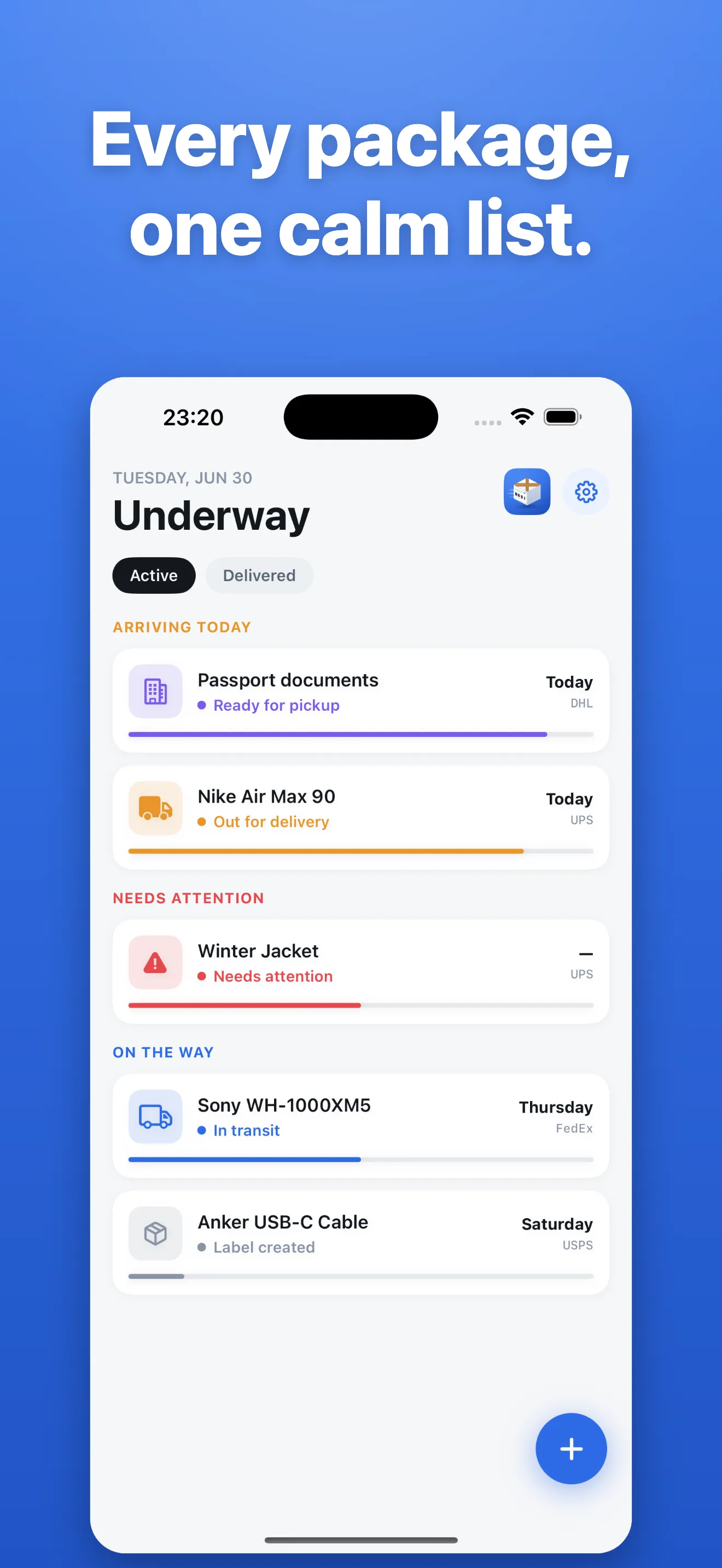
I made Underway because I wanted Parcel’s honesty with a modern iOS feature set and a hard line on privacy:
- No email access, ever. It learns about a parcel only when you paste a number, scan a barcode, or share one from Mail, Messages, Safari or a shop’s app.
- 900+ carriers, auto-detected from the number — USPS, UPS, FedEx, DHL, Amazon, PostNL, DPD, GLS, Evri, Royal Mail and the rest.
- Live Activity on delivery day — status on the Lock Screen and in the Dynamic Island until it lands — plus Home and Lock Screen widgets.
- No ads. Saving and checking parcels is free; Premium is $4.99 a week, $39.99 a year (the best value) or $99.99 once, with no trial. The post about Underway’s pricing explains why five, and why annual sits above the category’s $4.99.
- On-device list, synced through your own iCloud. There’s no Underway account.
Which one, honestly
- Most of your orders are from Shopify stores: Shop.
- You want a tracker that has been reliable for a decade and don’t care about Live Activities: Parcel.
- You want zero data entry and don’t mind an ad-supported data company reading receipts: AfterShip.
- You want one calm list, delivery day on the Lock Screen, and an app that will never ask for your inbox: Underway. The guide to tracking packages without giving an app your email covers the no-install options too.