People search for a Termius alternative for two different reasons. One group likes Termius and doesn’t like paying monthly for it. The other group has a terminal already and realises that what they wanted from a phone was not a terminal at all — it was to know which server is on fire without opening one.
I built Cura, so read the last section knowing that. The rest is as fair as I can make it, because I’ve used every app on this list.
Table of contents
Open Table of contents
What a phone SSH client has to get right
Before the list, the four things that separate good from usable-in-an-emergency:
- A real terminal. VT100/xterm escape sequences, so
vim,htop,lessandtmuxbehave. A “command runner” with a text box is not a terminal. - Modifier keys. ESC, CTRL, TAB and arrows are missing from every phone keyboard; the app has to supply them without covering half the screen.
- Key storage. Private keys in the Keychain or Keystore, hardware-backed, not in a file the app can read back and sync somewhere.
- Reconnection. Mobile networks drop. The session should survive a tunnel and a lock screen.
Termius
The polished one. Cross-platform (iOS, Android, desktop), good terminal, snippets, SFTP, and cloud sync of hosts and keys across devices. That sync is what people pay for, and it’s a subscription.
Where it’s strong: if you live in it on the desktop too, having the same hosts on the phone is genuinely useful. Where people leave: the monthly price for a tool they open twice a week, and the fact that keys live in a synced vault — encrypted, but not on-device-only. It has no monitoring: you don’t know a box is unhealthy until you’ve connected and typed something.
Blink Shell (iOS)
Built for people who want mosh and a keyboard-first workflow. Excellent terminal, mosh support means sessions survive network changes better than plain SSH, and it’s been around long enough to be trusted. The price model has moved between one-time and subscription over the years; check the current one.
Where it’s strong: the terminal itself, mosh, external keyboard users. Where it isn’t: it’s a terminal and nothing else, by design. Also iOS-only.
Prompt (iOS)
Panic’s client. Beautiful, careful, Panic-quality UI. Subscription. Strong on the basics, light on anything beyond the shell.
JuiceSSH (Android)
The long-standing Android choice. Free with a Pro unlock, Material-era design, solid terminal, snippets, port forwarding. It’s fine and I used it for years. Development has been slow for a while, and there’s no iOS version if you switch phones.
Termux (Android)
Not an SSH client — a full Linux userland on the phone, in which you install openssh and get a real ssh. Free, open source, extraordinarily capable. The learning curve is “you are now administering a second Linux box, which is your phone”. Nothing about it is designed around the 2 AM use case.
The gap all of them share
Every app above answers “give me a shell on this server”. None of them answers “which of my servers needs attention?” You find out by connecting to each one and running uptime, free -h, df -h — the same three commands, on a phone keyboard, while a service is down.
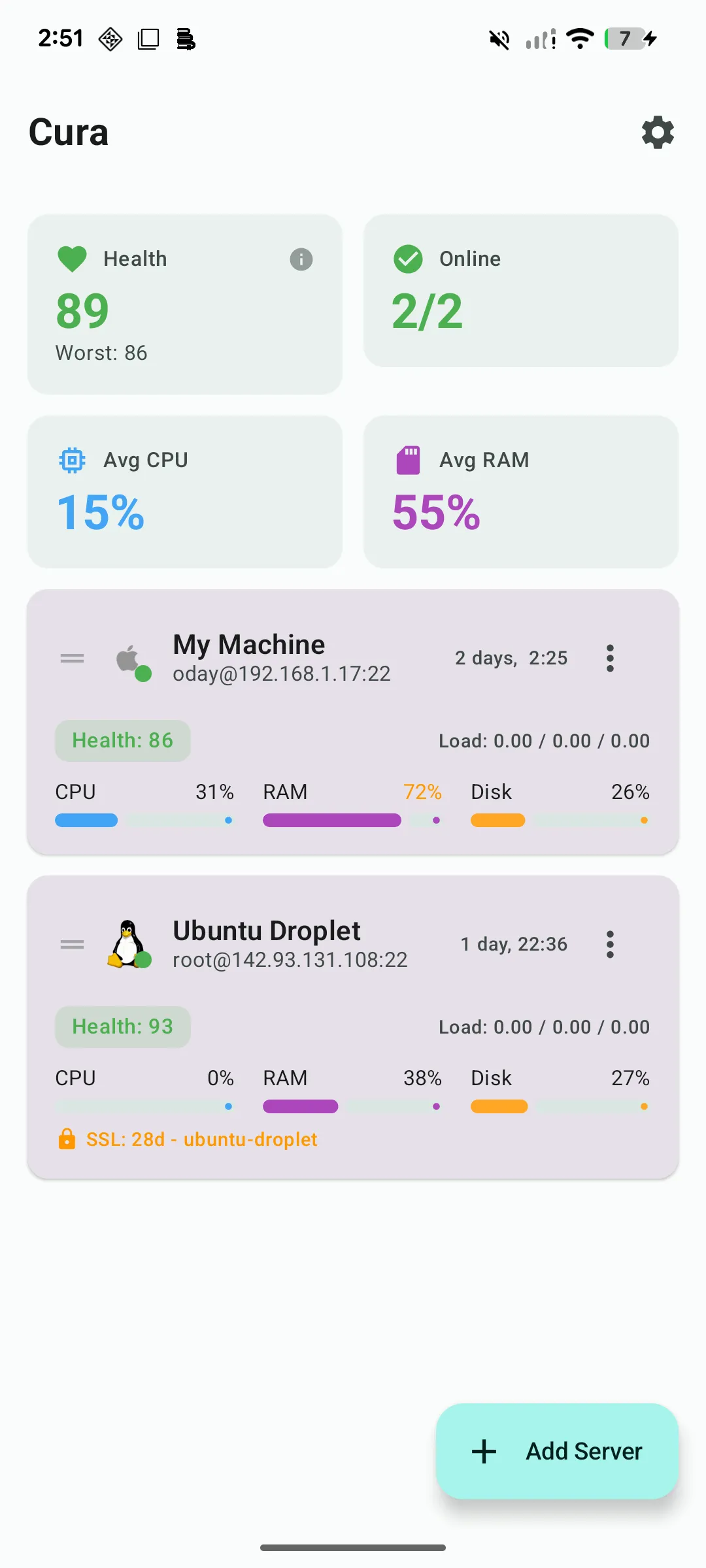
That gap is what Cura is for, and it’s the honest reason to consider it over a terminal-only app:
- A dashboard first. Every server with a health score, CPU, RAM, disk and SSL status on one screen, read over plain SSH — no agent installed on the box.
- Alerts while the app is closed. Thresholds for CPU, RAM, disk, uptime and certificate expiry; a notification tells you which process, not just “CPU high”.
- Runbooks. Your
uptime && free -h && df -hritual as a one-tap saved sequence, with a confirmation gate on destructive commands. - Docker, Podman and systemd as lists you can restart from, without a shell.
- Then a real terminal — VT100/xterm, modifier bar, session persistence — for when you do need one.
- One-time purchase. Free for two servers; Pro is a single payment, no subscription, no cloud vault — credentials stay in the Keychain/Keystore and the phone talks straight to your server.
Which one, honestly
- You want the best pure terminal on iOS and use an external keyboard: Blink.
- You want hosts synced across a desktop and a phone and don’t mind the subscription: Termius.
- You’re on Android, want free, and are happy to build your own tooling: Termux.
- You administer a handful of servers and want to see the problem before you open a shell, without paying rent: Cura. The guide on monitoring a Linux server from a phone walks through the non-app options too.